The era of physical signatures is ending faster than most expected. Remote work accelerated the shift to digital agreements, making electronic signature solutions essential for modern businesses. We've tested and analyzed two leading platforms - Adobe Sign and DocuSign - to help you make an informed decision.
While both tools might seem interchangeable at first glance, they serve different needs and excel in different areas. This comprehensive comparison breaks down their features, pricing structures, integration capabilities, and real-world performance. Whether you're a small team or an enterprise, you'll find the clarity you need to choose the right solution.
Adobe Sign
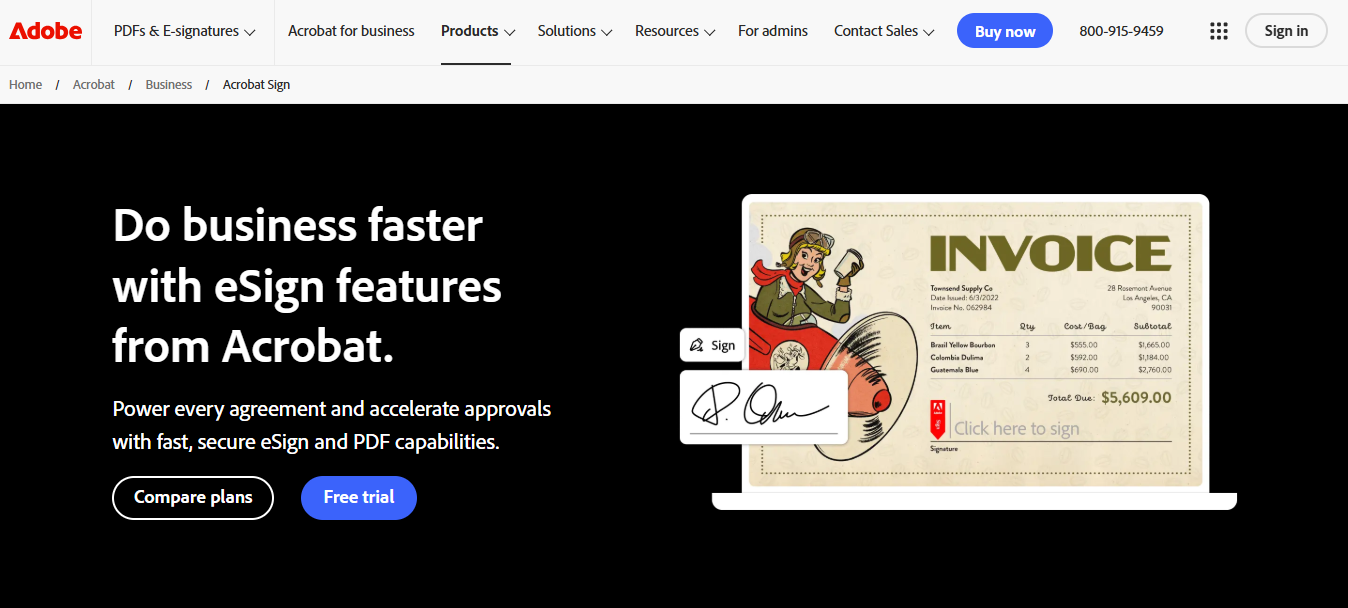
Image Source: Adobe
Adobe Acrobat Sign is Adobe's enterprise-grade e-signature solution, part of the wider Adobe Document Cloud ecosystem. It allows users to prepare, send, sign, and track documents electronically, while integrating deeply with tools like Acrobat, Microsoft 365, Salesforce, and Workday.
Born out of Adobe's legacy in digital documents and PDFs, Adobe Sign blends reliability with usability. It allows you to create legally binding digital signatures that come with audit trails, meaning your documents are secure and the signatures can be traced to the signers via their IP addresses. The tool also lets you create and edit documents which can be entirely white-labelled and branded, along with 24/7 live phone support.
DocuSign

Image Source: Docusign
DocuSign is one of the longest-established and most trusted names in electronic signatures and agreement management. It focuses primarily on delivering legal, scalable, compliance-ready e-signature workflows, with integrations and extensions into contract lifecycle management (CLM).
The tool lets you upload your documents and send them to clients very quickly. Once you send the documents, they can be signed at any time on any device. DocuSign allows more than 350 integrations and offers a free trial that lasts for 30 days. If you're interested in advanced branding options or customer support, you will have to pay more.
In short:
Adobe Sign = signature + automation + PDF/document integration across Adobe and Microsoft ecosystems
DocuSign = signature-first, secure, compliance-focused workflows, extensible into contract lifecycle features

Feature comparison
Let's see who wins in the Adobe Sign vs DocuSign debate and how the tools stack up against each other.

Both tools will help you digitally sign your contracts and proposals. However, they lack in the document creation process. If you want to create a document that needs to be signed, you'll need to create them from scratch. The only templates DocuSign and Adobe Sign offer are the ones you create yourself, which will slow down your sales process since you'll need considerable time to create every new document.
Ease of use
The best software means nothing if your team struggles to adopt it. A steep learning curve wastes time and creates frustration, which is why usability matters just as much as features.
Adobe Sign requires a more complex signing process. Users must navigate through multiple steps: accessing the review link, choosing a digital signature method, selecting Cloud Signature, managing Digital IDs, previewing the signature, authenticating through their provider with both PIN and one-time passcode, and finally completing the signature. This multi-layered approach, while secure, creates friction in what should be a simple task.
DocuSign takes a more streamlined approach. The interface is intuitive from the start - users simply drag signature fields to their desired locations, type their name, and the system converts it into a digital signature automatically. No complex authentication flows or multiple verification steps required. For teams prioritizing speed and simplicity, DocuSign clearly wins this category.
Pricing
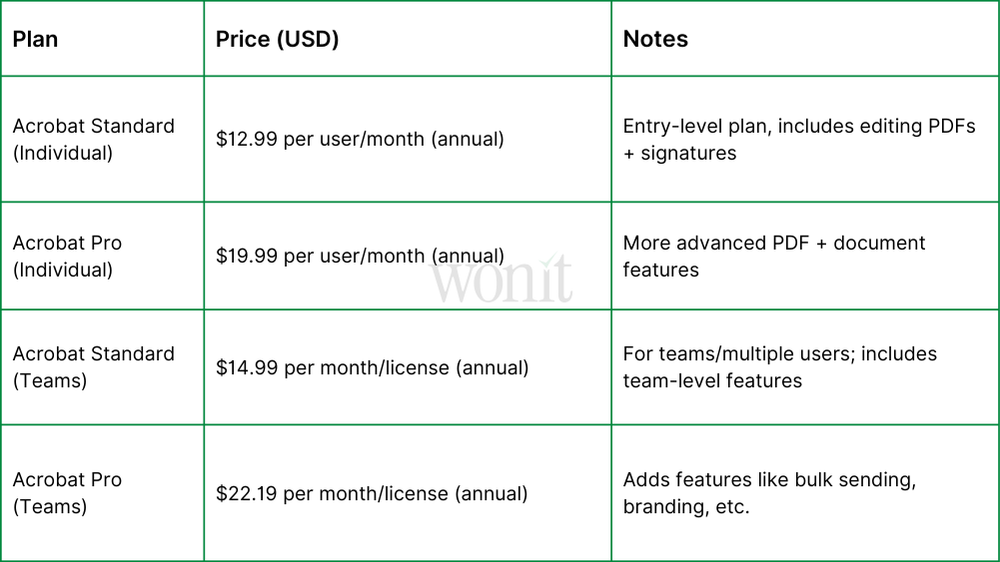
Both tools have different plans for people and teams. Adobe Sign is good if you use other Adobe tools. DocuSign is simple and easy for just signing documents.
Adobe Sign pricing:
DocuSign pricing:

Integrations
When it comes to integrations, DocuSign takes the win with its extensive network, especially for enterprise stacks. All plans include basic integrations, while the Business Pro plan offers integrations with Salesforce, SugarCRM, and more.
Adobe Sign mostly offers deep ties to Microsoft 365, Salesforce, Workday, and Adobe's own suite. If you're in the Microsoft or Adobe ecosystem, Adobe Sign is ideal. However, DocuSign dominates in legal and enterprise contexts with its broader third-party integration support.
Limitations
Both tools are good, but they have some limits. Adobe Sign works best if you use other Adobe tools, while DocuSign can be costly with extra features. Let’s see what each tool cannot do.
Adobe Sign limitations
While Adobe Sign delivers solid eSignature capabilities, it falls short in certain areas. Collaboration and redlining features are relatively limited, making it less ideal for teams that need to negotiate or edit contracts directly within the platform. Payment collection isn't built in and relies on third-party integrations, which can add complexity. Additionally, Adobe Sign performs best within the broader Adobe ecosystem - if your organization operates outside of that stack, the experience can feel less seamless.
DocuSign limitations
DocuSign's primary drawbacks revolve around flexibility and cost. The platform isn't well-suited for creating visually rich or heavily branded layouts. Proposals or presentations are better handled elsewhere. As you add advanced modules like CLM or analytics, pricing can escalate quickly. Many of the deeper automation or workflow capabilities also require extra setup or third-party integrations.
General limitations for both
Both tools come with vendor lock-in risks - migrating templates and workflows to another platform can be costly and time-consuming. You'll also want to review data residency and regional compliance standards carefully. Even the best tool underperforms if it doesn't fit your team's workflow.
Conclusion
When it comes to Adobe Sign vs DocuSign, DocuSign is the better choice for most users. It is easier to use, more affordable, and supports more users on lower plans, while also offering better integrations with many tools. Adobe Sign is a good option if your team already uses other Adobe products, as it offers strong PDF editing and secure e-signature features. However, for a simple, flexible, and widely compatible solution, DocuSign usually gets the job done better. Your choice will depend on your workflow, budget, and which ecosystem fits your team best.